
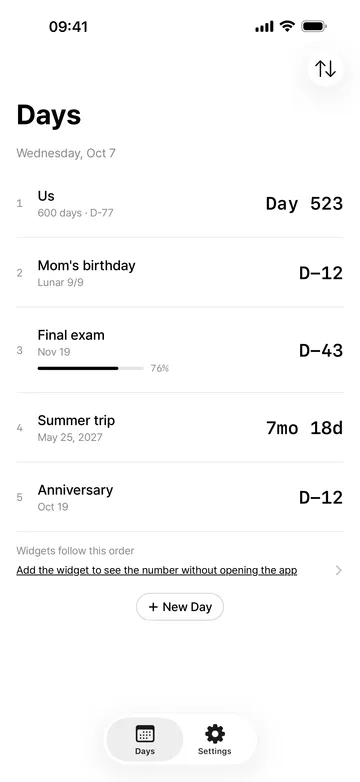
Daydays until, days since, as one plain number
a date and a title

iOS · iPad · free, Day Pro
when
Countdown screens covered in stickers clash with your Home Screen, and a birthday kept on the lunar calendar means looking up its date again every year.
screenshots
- Day Pro
- Day Pro
free & pro
start free, add Day Pro when you need it
free
- Up to 3 days, counted as days until, days since, or a yearly date
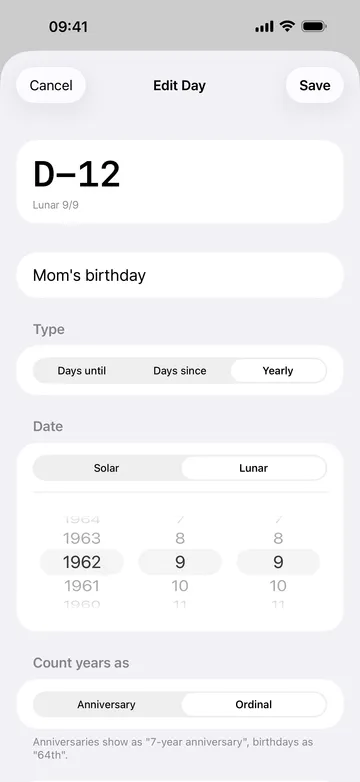
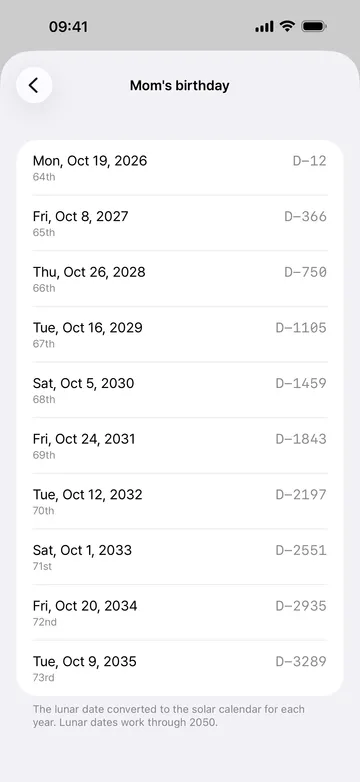
- Korean lunar dates with leap months, and the solar date they fall on each year
- Count in days, weeks, or months, yearly dates as anniversaries or ordinals, and upcoming 100-day marks and anniversaries
- A progress bar in the app when you set a start date
- The small and Lock Screen widgets, an on-the-day notification for each day, and share cards
- Automatic iCloud backup, plus JSON and CSV export and import
Day Pro
- Unlimited days
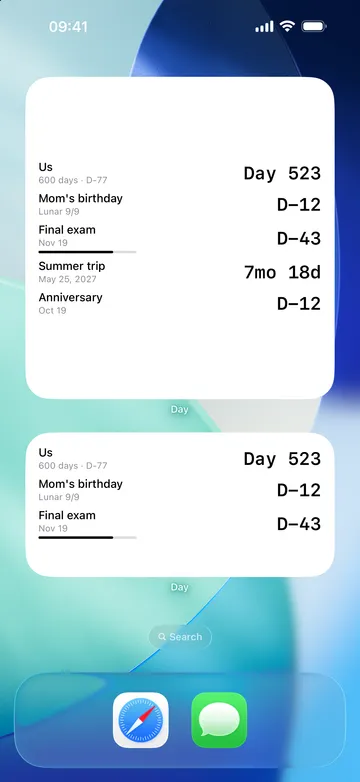
- Medium and large widgets that show several days, with progress bars on widgets too
- Reminders the day before, 3 days before, and 7 days before, and a separate notification time for each day
- A color and icon for each day in the list and on widgets
- A choice of number size and alignment for your widgets
how it works
done in 4 steps
- On Days, tap New Day below the list.
- Pick Anniversary, Birthday, Exam, or Trip and the counting style and milestones are filled in. Type a title and a date, then save. For a lunar date, choose Lunar under Date.
- Put a Day widget on your Home Screen or Lock Screen.
- Long-press the widget and choose Edit Widget to pick which day it shows. The numbers follow the order of your list in the app.
what it doesn't do
good to know before you install
- Day counts in days. It doesn't show hours or minutes left.
- Lunar dates work from 1900 through 2050.
- No photos or background images. It's a black-and-white number, with a color and icon per day in Day Pro.
- There's no account, so you can't edit the same day together with someone else. You can send it as a card image.
- Available on iPhone and iPad only.
faq
Can I keep a lunar birthday?
Yes. Choose Lunar under Date, leap months included, and see which solar date it falls on each year ahead. Lunar dates are calculated on your iPhone from public data by the Korea Astronomy and Space Science Institute.
How many days can I add?
Up to 3 for free. A fourth day and beyond comes with Day Pro. On the free plan, Edit Widget shows numbers 1 to 3, so you won't pick an empty one.
Will I get a lot of notifications?
No. You can turn on an on-the-day notification for each day, and if you leave it off, nothing arrives. Reminders the day before, 3 days before, and 7 days before come with Day Pro.
Where are my days kept?
On this device, and the developer can't see them. There's no account, and an automatic iCloud Drive backup lets you restore on a new device. Export to JSON or CSV and import it back anytime. Anonymous usage stats never include what you write, and you can turn them off in Settings.
What happens to my days if I stop Day Pro?
Days you already have stay, including the fourth and beyond, and you can still edit them. Only new days follow the 3-day limit again. Your reminder settings and widget look aren't deleted, but early reminders and per-day notification times stop, and the wide widgets show the one day you picked.

